
Every domain registrar now claims to have an "AI-powered" name generator. GoDaddy has one. Namecheap has one. Shopify has one.
But here's what they don't tell you: most of these tools aren't using AI in any meaningful way. They're doing what domain tools have done for 15 years — mashing keywords together and checking availability.
The word "AI" has become marketing decoration. Let's cut through it.

How Traditional Domain Generators Actually Work
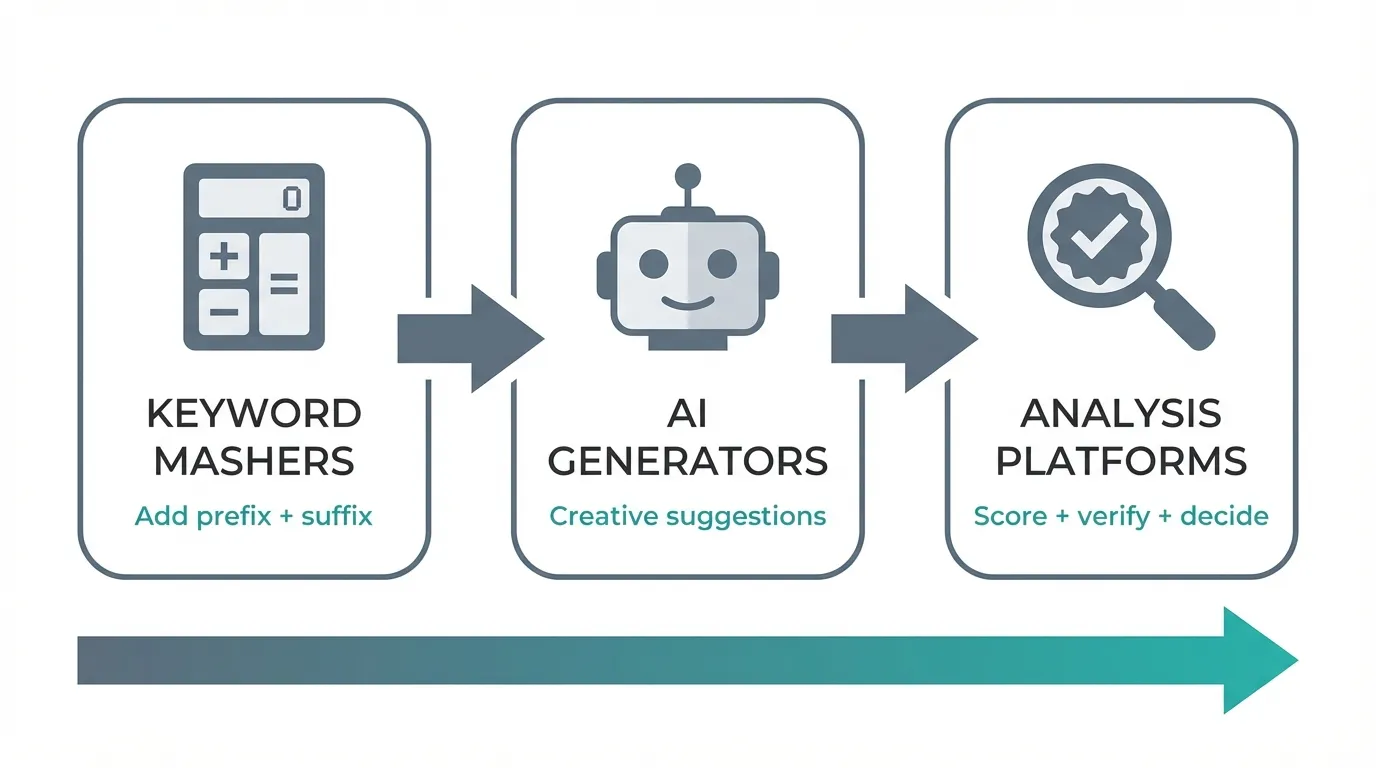
Traditional domain generators follow a simple formula. You enter one or more keywords - say, "cloud" and "storage" - and the tool generates variations:
- Prefix/suffix additions: CloudStorageHub, MyCloudStorage, CloudStoragePro
- Keyword mashups: StorCloud, CloudStor, Storiage
- Word combinations: CloudVault, DataCloud, CloudKeep
- TLD variations: cloudstorage.io, cloudstorage.app, cloudstorage.store
This approach has clear advantages. It's fast, predictable, and requires no "thinking" from the algorithm. If you need a domain that literally describes what you do, these tools will find one.
The catch? Most good keyword combinations were registered years ago. The .com availability crisis isn't new - it's been building since the late 1990s. Traditional generators keep serving up obvious combinations that are almost always taken, leaving you with increasingly awkward variations or obscure TLDs.
What "AI" Actually Means (And Doesn't Mean)
When GoDaddy's Business Name Generator or Namecheap's generator says "AI-powered," what's actually happening?
Keyword combination. You type "fast delivery" and get suggestions like:
- FastDeliveryHub
- DeliveryFastNow
- QuickDeliveryPro
- FastShipSolutions
This isn't artificial intelligence. It's string concatenation with a thesaurus. The same technique domain tools used in 2010, now with better marketing.
Real AI — the kind that powers ChatGPT, Claude, and Gemini — can understand context, make creative leaps, evaluate quality, and explain reasoning. It can brainstorm like a human naming consultant, not just shuffle word combinations.
Here's what that looks like in practice:
Input: "AI-powered tool that helps developers find bugs in their code"
Traditional generator output: BugFinderAI, CodeBugDetector, AIDebugTool, BugHunterPro
AI generator output: Sentinel, Cleancode, Bugwise, Scrutiny, Codeguard, Refract
The difference is significant. The AI-generated names are brandable - they could work across contexts, they're easier to remember, and they don't sound like search queries.
The Registrar Tool Problem
Registrar-based generators have a fundamental conflict of interest: they want you to buy domains from them. This shapes everything about how they work.
What you get from registrar tools:
| Tool | What It Actually Does |
|---|---|
| GoDaddy Generator | Keyword combinations + pushes premium domains |
| Namecheap Generator | Synonym swapping + upsells to aftermarket |
| Shopify Generator | Basic keyword matching + Shopify domain purchase |
| Domain.com | Traditional search + premium suggestions |
These tools are free because you are the product. They exist to funnel you toward domain purchases, ideally premium domains with higher margins.
There's nothing wrong with using them for quick availability checks. But don't expect creative naming help. You'll get "YourKeyword + Suffix" variations until you give up and buy something mediocre.
What "Availability Check" Actually Means
You type your dream domain into a generator. It shows a green checkmark. Available! You click through to register and discover it's $4,500 on the aftermarket. Or worse - you register a "cheap" alternative TLD and later find out the .com is owned by a competitor.
The phrase "domain availability check" covers a lot of ground:
Basic WHOIS lookup - The domain isn't currently registered. That's it. No information about premium pricing, similar domains, or whether someone's squatting on the .net version.
Multi-TLD verification - Checking the same name across .com, .io, .ai, .app, and specialty extensions. Shows which versions are available and which are taken.
Real pricing data - Not just "available" but "available for $12/year" vs "available for $8,000 on the aftermarket." Huge difference.
Background verification - Is the domain actually available, or is it showing as available but pending renewal, in a grace period, or held by a domain parking service?
Most free tools do only the first option. The others require paid APIs that cost money per lookup.
Categories of Domain Name Tools
Let me break down what different tool types actually deliver:
1. Registrar Search Bars
Examples: GoDaddy domain search, Namecheap, Google Domains
What they check:
- Single domain at a time
- Their own inventory and partner registries
- Shows pricing (including premium upsells)
What they miss:
- No bulk generation - you have to think of names yourself
- Heavily pushes premium/aftermarket domains
- No analysis of similar domains or risks
Best for: Checking specific names you already have in mind
2. Free Keyword Generators
Examples: Lean Domain Search, NameMesh
What they check:
- Keyword combinations + .com availability
- Some show .net, .org alternatives
What they miss:
- No pricing (just "available" or "taken")
- Limited TLD coverage
- No premium domain visibility
- No risk analysis
Best for: Quick brainstorming when budget is zero
3. Instant Search Tools
Examples: Instant Domain Search, Domainr
What they check:
- Real-time as-you-type results
- Multiple TLDs simultaneously
- Shows premium domain pricing
What they miss:
- You still provide the keywords (no creative generation)
- No quality scoring or recommendations
- No similar business detection
Best for: Fast availability verification of your own ideas
4. AI-Powered Platforms
What they check:
- Generate creative names (not just keyword mashing)
- Multi-TLD availability with pricing
- Quality scoring and ranking
- Risk signals and similar business detection
What they miss:
- Not free (AI and availability APIs cost money)
- May have session limits
Best for: Actual naming decisions with full analysis
The Quality Question: "Name Slop"
AI generators produce more creative output on average, but creativity alone doesn't make a good brand name. A naming agency called NameStormers recently published a critique of AI-generated names, coining the term "name slop" - names that sound clever but "lack the distinctiveness, legal defensibility, and emotional resonance that successful brands require."
Their core criticism: AI models "remix what's already on the web, not what a future name could be." The result can be a "sea of sameness" where AI-generated startup names start to blur together.
This is a fair point - but it's also a criticism of how most people use AI naming tools, not the tools themselves.
The problem isn't AI generation. It's AI generation without evaluation.
A raw list of 50 AI-generated names isn't useful on its own. What matters is:
- Which names are actually available?
- Which score well on brand metrics?
- Which carry hidden risks?
- Which align best with your specific positioning?
Feature Comparison: Real AI vs Marketing "AI"
Here's an honest comparison of what different tool types actually deliver:
| Feature | Registrar Tools | Basic AI | Sophisticated AI |
|---|---|---|---|
| Name generation | Keyword + suffix | LLM-powered | LLM + scoring |
| Understands context | No | Somewhat | Yes |
| Quality scoring | No | No | Yes |
| Risk detection | No | No | Yes |
| Availability checking | Own inventory | Basic | Multi-TLD with pricing |
| Explains recommendations | No | Sometimes | Yes |
| Price | Free | Free-$10 | $10-20 |
| Best for | Quick checks | Brainstorming | Actual decisions |
The Hidden Costs of "Free" Tools
Free tools have to make money somehow. Common patterns:
Affiliate revenue - They earn commission when you buy through their links. This incentivizes showing you domains that pay higher commissions, not domains that are best for you.
Data collection - Your searches reveal what you're building. That data has value to marketers and competitors.
Premium upsells - Show you the "available" name, then reveal it's aftermarket-priced once you're emotionally invested.
Registrar lock-in - Free generators built by registrars want you buying from them, not comparison shopping.
None of these are evil. But they explain why free tools often give shallow or biased data.
We covered this in detail in why this type of tool can't be free. The short version: if a naming tool is free, it's either using fake "AI" or monetizing you some other way.
What True AI Naming Looks Like
A genuinely AI-powered naming tool doesn't just generate strings. It thinks about naming the way a human consultant would:
1. Creative Brainstorming Real AI can make conceptual leaps. If you're building a meditation app, it won't just suggest "MeditateNow" and "CalmMindApp." It might suggest "Stillpoint" or "Quietude" — names that evoke the feeling without using obvious keywords.
2. Quality Evaluation Humans instinctively know that "Stripe" is a better name than "OnlinePaymentProcessor." True AI can score names on memorability, pronunciation, and brandability — not just availability.
3. Risk Analysis Is there already a company with a similar name? Does this word have negative connotations in other languages? A keyword masher can't answer these questions. AI can at least flag obvious risks. For a deeper dive into trademark and brand risks, see our dedicated guide.
4. Contextual Understanding Tell a registrar tool you're building "a B2B fintech for SMB invoice factoring" and watch it suggest "InvoiceFactoringB2B.com." Real AI understands the context and generates names appropriate for the space.
5. Iterative Refinement Human naming is conversational. "I like the direction of that one, but shorter." "More playful, less corporate." True AI can take feedback and refine, not just regenerate random options.
When Traditional Generators Still Make Sense
Traditional keyword-based generators aren't obsolete. They're genuinely useful when:
You need a descriptive domain for a specific purpose. Setting up a landing page for "Portland Dog Walking"? A traditional generator will efficiently find pdxdogwalking.com or portlanddogwalker.net.
You're working in a narrow niche with established terminology. Some industries have naming conventions where keyword-based names are expected - legal services, medical practices, local trades.
You want to explore TLD options for an existing name. Already have a name in mind? Traditional tools are fine for checking what's available across extensions.
Budget is zero and you just need ideas. Most traditional generators are free. If you're bootstrapping and just need to brainstorm, they're a reasonable starting point.
When AI Generators Are Worth It
AI-powered naming tools make sense when:
You're building a brand, not just buying a domain. If the name will be on pitch decks, business cards, and marketing materials for years, the extra investment in quality is justified.
Creativity matters more than keyword match. Consumer brands, tech startups, creative agencies - anywhere that memorable beats descriptive.
You've already tried traditional generators and hit dead ends. When every obvious combination is taken, AI's ability to generate novel options becomes valuable.
You want data-driven confidence. If you need to justify a naming decision to co-founders, investors, or yourself, scored recommendations beat gut feelings.
What URLGenie Does Differently
We built URLGenie because we got tired of the keyword-masher experience. Here's how it actually works:
Step 1: Understand the context You describe your product, audience, and preferences. The AI interprets this — it doesn't just extract keywords.
Step 2: Creative generation Using large language models, URLGenie brainstorms ~50 genuinely creative names per session. Not "YourKeyword + Hub." Names that a human naming consultant might suggest.
Step 3: Multi-factor scoring Every name gets analyzed on five brand metrics: Brand Fit, Verbal Clarity, SEO Potential, Resale Value, and Authority. You see a ranked list, not an alphabetical dump.
Step 4: Availability verification Real-time checks across multiple TLDs, with actual pricing where available. No bait-and-switch with premium domains you can't afford.
Step 5: Risk signals The system flags potential issues: similar existing businesses, crowded naming spaces, terms with problematic associations. Not a substitute for legal review, but catches obvious problems early.
Step 6: Summary and recommendations You get a report explaining why certain names ranked higher — so you can make an informed decision, not just pick randomly from a list.

The Cost Reality
Registrar tools are free because they're lead generation. True AI tools cost money because:
- LLM API calls aren't free (ChatGPT, Claude, Gemini all charge per token)
- Real-time domain availability APIs charge per lookup
- Quality analysis requires multiple AI passes per name
URLGenie costs around $15 for a full naming session with ~50 analyzed names. That's roughly what you'd spend on coffee while manually testing domain ideas for a day — except you get scored, ranked results with risk analysis instead of a headache.
The Bottom Line
"AI-powered" has become meaningless marketing language. Every registrar claims it. Few deliver it.
The test is simple: Does the tool understand your business context? Does it score and rank suggestions? Does it explain why names are good or flag potential risks? Can it refine based on feedback?
If the answer to these questions is "no," you're using a keyword masher with good branding.
A green checkmark that hides a $5,000 price tag isn't availability checking. It's a sales funnel.
Choose tools that give you the full picture, not just the part that gets you to click "buy."
Ready to see the difference? URLGenie generates brandable names, checks real availability across TLDs, scores every option against five brand metrics, and flags potential risks - in about five minutes. Try it with your business idea and compare the output to any traditional generator. The quality gap is hard to miss.